/* global React, Dashboard, Sparkline */
// ============================================================
// InfraMind — page section components
// ============================================================

const { useState } = React;

// ---------------- shared icon (precise engineering glyph) ---------------
function Glyph({ name, size = 22 }) {
  const s = size;
  const stroke = "currentColor";
  const sw = 1.25;
  const common = {
    width: s, height: s, viewBox: "0 0 24 24", fill: "none",
    stroke, strokeWidth: sw, strokeLinecap: "square", strokeLinejoin: "miter"
  };
  switch (name) {
    case "layers":
      return <svg {...common}><path d="M3 7l9-4 9 4-9 4-9-4z" /><path d="M3 12l9 4 9-4" /><path d="M3 17l9 4 9-4" /></svg>;
    case "cube":
      return <svg {...common}><path d="M3 7l9-4 9 4v10l-9 4-9-4V7z" /><path d="M3 7l9 4 9-4" /><path d="M12 11v10" /></svg>;
    case "scan":
      return <svg {...common}><path d="M3 8V4h4" /><path d="M21 8V4h-4" /><path d="M3 16v4h4" /><path d="M21 16v4h-4" /><path d="M7 12h10" /></svg>;
    case "target":
      return <svg {...common}><circle cx="12" cy="12" r="8" /><circle cx="12" cy="12" r="3" /><path d="M12 2v4M12 18v4M2 12h4M18 12h4" /></svg>;
    case "wave":
      return <svg {...common}><path d="M2 12c3 0 3-6 6-6s3 12 6 12 3-12 6-12 3 6 6 6" /></svg>;
    case "doc":
      return <svg {...common}><path d="M5 3h10l4 4v14H5z" /><path d="M15 3v4h4" /><path d="M8 12h8M8 16h8M8 8h3" /></svg>;
    case "shield":
      return <svg {...common}><path d="M12 3l8 3v6c0 5-3.5 8-8 9-4.5-1-8-4-8-9V6l8-3z" /></svg>;
    case "lock":
      return <svg {...common}><rect x="4" y="11" width="16" height="10" /><path d="M8 11V7a4 4 0 018 0v4" /></svg>;
    case "trail":
      return <svg {...common}><circle cx="6" cy="6" r="2" /><circle cx="18" cy="18" r="2" /><path d="M8 6h6a4 4 0 014 4v6" /></svg>;
    case "globe":
      return <svg {...common}><circle cx="12" cy="12" r="9" /><path d="M3 12h18M12 3c3 3 3 15 0 18M12 3c-3 3-3 15 0 18" /></svg>;
    case "download":
      return <svg {...common}><path d="M12 3v12M7 11l5 5 5-5" /><path d="M5 21h14" /></svg>;
    case "settings":
      return <svg {...common}><circle cx="12" cy="12" r="3" /><path d="M19 12a7 7 0 00-.15-1.4l2-1.5-2-3.4-2.4.9a7 7 0 00-2.4-1.4L13.5 2.5h-3l-.55 2.7a7 7 0 00-2.4 1.4l-2.4-.9-2 3.4 2 1.5A7 7 0 005 12c0 .48.05.94.15 1.4l-2 1.5 2 3.4 2.4-.9a7 7 0 002.4 1.4l.55 2.7h3l.55-2.7a7 7 0 002.4-1.4l2.4.9 2-3.4-2-1.5c.1-.46.15-.92.15-1.4z" /></svg>;
    case "graph":
      return <svg {...common}><path d="M4 20V4M4 20h16" /><path d="M8 16l4-6 3 3 5-8" /></svg>;
    default:
      return <svg {...common}><rect x="4" y="4" width="16" height="16" /></svg>;
  }
}

// ====================== Navigation ======================
function Nav({ active = "home" }) {
  const links = [
  { id: "home", href: "index.html", label: "Home" },
  { id: "platform", href: "platform.html", label: "Platform" },
  { id: "solutions", href: "solutions.html", label: "Solutions" },
  { id: "tech", href: "technology.html", label: "Technology" },
  { id: "blog", href: "blog.html", label: "Blog" },
  { id: "about", href: "about.html", label: "About" }];

  return (
    <nav className="nav">
      <div className="container nav-inner">
        <a href="index.html" className="nav-brand">
          <img src="assets/inframind-icon.png" alt="" className="brand-icon" />
          <span className="brand-word">INFRAMIND</span>
        </a>
        <div className="nav-links">
          {links.map((l) =>
          <a key={l.id} href={l.href} style={active === l.id ? { color: "var(--ink-1000)", fontWeight: 500 } : null}>{l.label}</a>
          )}
        </div>
        <div className="nav-cta">
          <a href="https://app.inframindlabs.com" target="_blank" rel="noopener" className="login" onClick={(e) => {
            // graceful degrade: if the app subdomain hasn't been provisioned yet, redirect to contact
            // instead of showing a broken-link error to the user.
            // (Remove this handler once app.inframindlabs.com is live.)
            e.preventDefault();
            const w = window.open("https://app.inframindlabs.com", "_blank", "noopener");
            // Most browsers won't let us inspect cross-origin status — best we can do is provide
            // a fallback link to contact if the popup is blocked.
            if (!w) {window.location.href = "contact.html";}
          }}>Sign in</a>
          <a href="contact.html" className="btn btn-primary">Book a Demo</a>
        </div>
      </div>
    </nav>);

}

// ====================== Hero ======================
function Hero({ headline }) {
  return (
    <section className="hero" data-screen-label="01 Hero">
      <div className="hero-grid-bg"></div>
      <div className="container hero-inner">
        <div className="hero-left">
          <span className="eyebrow">Infrastructure Intelligence Platform</span>
          <h1>{headline}</h1>
          <p className="subhead">
            LiDAR, imagery and inspection records — turned into risk-ranked engineering decisions.
          </p>
          <div className="hero-ctas">
            <a href="contact.html" className="btn btn-primary">Book a Demo</a>
            <a href="platform.html" className="btn btn-secondary">Explore the Platform →</a>
          </div>
          <div className="trustline">
            Built for tunnels, bridges, and complex infrastructure environments
          </div>
        </div>

        <div style={{ width: "100%" }}>
          <div className="mockup-frame hero-film-frame">
            <div className="hero-film">
              <iframe
                src="animation.html"
                title="InfraMind platform workflow"
                loading="eager"
                allow="autoplay" />
              
            </div>
          </div>
        </div>
      </div>

      <div className="container">
        <div className="hero-meta">
          <span className="eyebrow">From raw infrastructure data to risk-ranked engineering decisions</span>
          <div style={{ display: "flex", gap: 28, flexWrap: "wrap", fontFamily: "var(--font-mono)", fontSize: 11, color: "var(--ink-500)", letterSpacing: "0.04em", textTransform: "uppercase", justifyContent: "flex-end" }}>
            <span>LiDAR</span><span>Imagery</span><span>Inspection records</span><span>Historical data</span>
          </div>
        </div>
      </div>
    </section>);

}

// ====================== Trust Strip ======================
function TrustStrip() {
  const items = [
  "Cambridge spinout",
  "Built with infrastructure engineers",
  "UK & EU data hosting"];

  return (
    <div className="trust-strip">
      <div className="container trust-strip-inner">
        <div className="trust-items">
          {items.map((t) =>
          <span key={t} className="trust-item"><span className="dot"></span>{t}</span>
          )}
        </div>
      </div>
    </div>);

}

// ====================== Problem ======================
function Problem() {
  const items = [
  { t: "Inspections still happen by hand", b: "Hours of skilled engineering time spent finding and counting, not deciding." },
  { t: "Severity calls vary between inspectors", b: "Two engineers reviewing the same asset will rank defects differently." },
  { t: "Change between surveys gets missed", b: "Slow movement and worsening defects hide across campaigns until they're urgent." },
  { t: "No comparable priority across the portfolio", b: "Narrative reports per asset. Ranking spend across a network means re-reading every one." }];

  return (
    <section id="problem" data-screen-label="02 Problem">
      <div className="container">
        <div className="section-head">
          <span className="eyebrow">The problem</span>
          <h2>Infrastructure inspection is still done by hand.</h2>
          <p className="lead">
            The data is millimetre-accurate. The review is still frame by frame. The bottleneck isn't the data — it's the review.
          </p>
        </div>
        <div className="problem-grid">
          <div className="problem-list">
            {items.map((it, i) =>
            <div className="problem-item" key={i}>
                <div className="num">0{i + 1}</div>
                <div>
                  <h4>{it.t}</h4>
                  <p>{it.b}</p>
                </div>
              </div>
            )}
          </div>
          <ProblemDiagram />
        </div>
      </div>
    </section>);

}

// Simple before/after diagram comparing fragmented inputs → unified asset view
function ProblemDiagram() {
  return (
    <div style={{ position: "sticky", top: 100 }}>
      <div style={{ border: "1px solid var(--grey-200)", background: "white" }}>
        <div style={{ padding: "16px 20px", borderBottom: "1px solid var(--grey-200)", fontFamily: "IBM Plex Mono, monospace", fontSize: 11, letterSpacing: "0.08em", textTransform: "uppercase", color: "var(--grey-500)" }}>
          Today's inspection workflow
        </div>
        <div style={{ padding: 24, display: "flex", flexDirection: "column", gap: 16 }}>
          <DiagramRow label="LiDAR scans" tag=".LAS .E57" color="#22D3EE" />
          <DiagramRow label="Site imagery" tag=".JPG .TIFF" color="#9CA3AF" />
          <DiagramRow label="Inspection reports" tag=".PDF .XLSX" color="#9CA3AF" />
          <DiagramRow label="Historical records" tag=".CAD .GIS" color="#9CA3AF" />
          <div style={{ height: 1, background: "var(--grey-200)", margin: "8px 0" }}></div>
          <div style={{ display: "flex", justifyContent: "space-between", alignItems: "center" }}>
            <div style={{ display: "flex", flexDirection: "column", gap: 2 }}>
              <span style={{ fontSize: 13, fontWeight: 600 }}>Manual consolidation</span>
              <span style={{ fontFamily: "IBM Plex Mono, monospace", fontSize: 11, color: "var(--grey-500)" }}>3–6 weeks · engineer time</span>
            </div>
            <span style={{ fontFamily: "IBM Plex Mono, monospace", fontSize: 11, color: "var(--red)", letterSpacing: "0.04em", textTransform: "uppercase" }}>Bottleneck</span>
          </div>
        </div>
      </div>
    </div>);

}

function DiagramRow({ label, tag, color }) {
  return (
    <div style={{ display: "grid", gridTemplateColumns: "16px 1fr auto", gap: 14, alignItems: "center" }}>
      <span style={{ width: 10, height: 10, background: color, display: "inline-block" }}></span>
      <span style={{ fontSize: 14, color: "var(--ink)" }}>{label}</span>
      <span style={{ fontFamily: "IBM Plex Mono, monospace", fontSize: 11, color: "var(--grey-500)", letterSpacing: "0.02em" }}>{tag}</span>
    </div>);

}

// ====================== Platform / workflow ======================
function Platform() {
  const steps = [
  { k: "01", t: "Ingest", b: "LiDAR, imagery, and inspection records into one asset model." },
  { k: "02", t: "Detect", b: "AI measures defects across every modality in engineering units." },
  { k: "03", t: "Rank", b: "Severity + location + history combine into an explainable score." },
  { k: "04", t: "Decide", b: "Engineers confirm, edit, or reject — every decision is logged." }];

  return (
    <section id="platform" className="workflow" data-screen-label="03 Platform">
      <div className="container">
        <div className="section-head">
          <span className="eyebrow">The platform</span>
          <h2>From survey data to engineering decision, in four stages.</h2>
        </div>

        <div className="workflow-steps">
          {steps.map((s, i) =>
          <div className="step compact" key={i}>
              <span className="step-num">{s.k}</span>
              <h4>{s.t}</h4>
              <p className="step-body">{s.b}</p>
            </div>
          )}
        </div>

        <div className="section-cta">
          <a href="platform.html" className="btn btn-secondary">Explore the platform →</a>
        </div>
      </div>
    </section>);

}

// ====================== Capabilities ======================
function Capabilities() {
  const caps = [
  { k: "A", t: "Multi-modal data integration", b: "LiDAR, imagery and records in one asset view.", g: "layers" },
  { k: "B", t: "3D asset intelligence", b: "Navigate the asset in 3D with mapped defects and measurements.", g: "cube" },
  { k: "C", t: "Automated defect detection", b: "AI finds visible defects and structural change. Engineers stay in control.", g: "scan" },
  { k: "D", t: "Risk scoring and prioritisation", b: "Rank by severity, location, confidence and urgency.", g: "target" },
  { k: "E", t: "Deformation and change analysis", b: "Compare campaigns. Surface movement and emerging risk.", g: "wave" },
  { k: "F", t: "Reporting and audit trail", b: "Evidence-backed reports and structured maintenance data.", g: "doc" }];

  return (
    <section id="capabilities" className="dark" data-screen-label="04 Capabilities">
      <div className="container">
        <div className="section-head">
          <span className="eyebrow">Capabilities</span>
          <h2>Six capabilities that change how inspection data becomes decisions.</h2>
        </div>

        <div className="caps-grid">
          {caps.map((c) =>
          <div className="cap" key={c.k}>
              <div className="cap-icon"><Glyph name={c.g} /></div>
              <div className="cap-key">Capability {c.k}</div>
              <h3>{c.t}</h3>
              <p>{c.b}</p>
            </div>
          )}
        </div>
      </div>
    </section>);

}

// ====================== Unified Asset Model ======================
function UnifiedAsset() {
  const sources = [
  { lbl: "LiDAR", ext: ".LAS .E57" },
  { lbl: "Imagery", ext: ".JPG .TIFF" },
  { lbl: "Inspection records", ext: ".PDF .XLSX" },
  { lbl: "As-built & GIS", ext: ".CAD .DWG" }];


  // Stacked evidence at one chainage — all describing CR-04
  const evidence = [
  { src: "LIDAR", v: "12.8 mm", note: "crack width @ 78°" },
  { src: "IMG", v: "plate 042", note: "visual confirmation" },
  { src: "RECORD", v: "2019", note: "earliest reported" }];


  return (
    <section id="unified" className="unified" data-screen-label="03 Unified Asset Model">
      <div className="container">
        <div className="section-head">
          <span className="eyebrow">Unified asset model</span>
          <h2>Every survey output, mapped onto one 3D model of the asset.</h2>
          <p className="lead">
            LiDAR, imagery, inspection records, and historical reports are co-registered to the same coordinate system — so an engineer can move between a point cloud, a photo, and a 2019 inspection note at the same chainage and see the same defect.
          </p>
        </div>

        <div className="unified-board">
          {/* Source row */}
          <div className="unified-sources">
            {sources.map((s, i) =>
            <div className="unified-source" key={s.lbl}>
                <div className="unified-source-num pm-mono">0{i + 1}</div>
                <div className="unified-source-l">{s.lbl}</div>
                <div className="unified-source-ext pm-mono">{s.ext}</div>
              </div>
            )}
          </div>

          {/* Flow arrows */}
          <div className="unified-flow" aria-hidden="true">
            <svg viewBox="0 0 1000 60" preserveAspectRatio="none" style={{ width: "100%", height: 60, display: "block" }}>
              {[0.10, 0.30, 0.50, 0.70, 0.90].map((p, i) =>
              <g key={i}>
                  <line x1={p * 1000} y1="0" x2="500" y2="56" stroke="var(--ink-300)" strokeWidth="1" strokeDasharray="2 3" />
                </g>
              )}
              <circle cx="500" cy="58" r="3" fill="var(--ink-1000)" />
            </svg>
          </div>

          {/* The unified 3D twin */}
          <div className="unified-twin">
            <div className="twin-head">
              <div className="twin-crumb pm-mono">
                <span className="pm-dim">InfraMind</span>
                <span className="pm-dim">/</span>
                <span className="pm-dim">England</span>
                <span className="pm-dim">/</span>
                <span className="pm-dim">West Yorkshire</span>
                <span className="pm-dim">/</span>
                <span>Demo Tunnel</span>
              </div>
              <div className="twin-tabs">
                {["3D", "Map", "List", "Docs"].map((t, i) =>
                <button key={t} className={`twin-tab ${i === 0 ? "active" : ""}`}>{t}</button>
                )}
              </div>
            </div>

            <div className="twin-body">
              {/* 3D model canvas */}
              <div className="twin-canvas">
                <UnifiedTwinSvg />
                {/* defect call-out */}
                <div className="twin-callout">
                  <div className="twin-callout-head">
                    <span className="twin-callout-id pm-mono">CR-04</span>
                    <span className="twin-callout-sev">CRITICAL</span>
                  </div>
                  <div className="twin-callout-title">Longitudinal crack · crown · ch 412.6 m</div>
                  <div className="twin-callout-evidence">
                    {evidence.map((e) =>
                    <div className="evidence-row" key={e.src}>
                        <span className="evidence-src pm-mono">{e.src}</span>
                        <span className="evidence-val">{e.v}</span>
                        <span className="evidence-note pm-dim">{e.note}</span>
                      </div>
                    )}
                  </div>
                </div>
              </div>

              {/* Right: layer toggles */}
              <div className="twin-layers">
                <div className="twin-layers-lbl pm-mono pm-dim">VISIBLE LAYERS</div>
                {[
                { l: "Point cloud (LiDAR)", n: "2.4M pts", on: true },
                { l: "Imagery plates", n: "47 plates", on: true },
                { l: "Defects", n: "138 items", on: true },
                { l: "Historical reports", n: "3 docs", on: true },
                { l: "As-built drawings", n: "2 sheets", on: false }].
                map((layer) =>
                <label className="twin-layer" key={layer.l}>
                    <span className={`twin-layer-check ${layer.on ? "on" : ""}`}>
                      {layer.on && <span className="twin-layer-check-i">✓</span>}
                    </span>
                    <span className="twin-layer-l">{layer.l}</span>
                    <span className="twin-layer-n pm-mono pm-dim">{layer.n}</span>
                  </label>
                )}
              </div>
            </div>

            <div className="twin-foot">
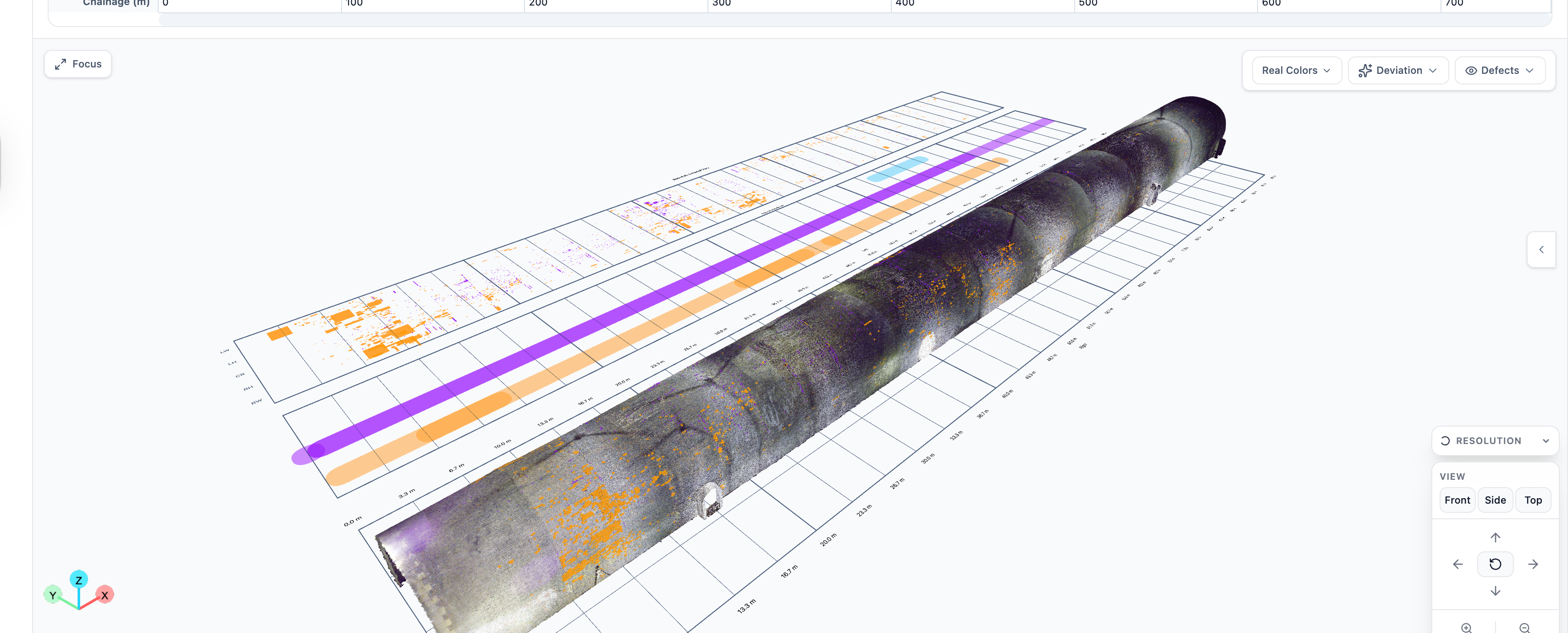
              <span className="pm-mono pm-dim">Co-registered · 1 coordinate system · 4 modalities</span>
              <span className="pm-mono">575 defects · 5 line items · 53.9091 m²</span>
            </div>
          </div>
        </div>
      </div>
    </section>);

}

function UnifiedTwinSvg() {
  // Pre-rendered HD crop of the 3D scan (canvas-resampled) — displayed
  // 1:1 at native size, no CSS transform → maximum sharpness possible from
  // the source 1280×720 product capture.
  return (
    <div className="twin-canvas-img-wrap">
      <img
        src="assets/scan-3d.png"
        alt="3D digital twin of Demo Tunnel — LiDAR point cloud with classified defects"
        className="twin-canvas-img"
      />
      <div className="twin-canvas-img-fade"></div>
    </div>
  );
}
function UseCases() {
  const items = [
  { t: "Asset owners",            href: "solutions.html#owners" },
  { t: "Engineering consultants", href: "solutions.html#consultants" },
  { t: "Repair contractors",      href: "solutions.html#contractors" },
  { t: "Risk & due diligence",    href: "solutions.html#risk" }];


  return (
    <section id="usecases" className="usecases" data-screen-label="05 Use Cases">
      <div className="container">
        <div className="section-head">
          <span className="eyebrow">Who it's for</span>
          <h2>Built for the people who own the decision.</h2>
        </div>

        <div className="usecase-rowlist">
          {items.map((u) =>
          <a className="usecase-row" key={u.t} href={u.href}>
              <span className="usecase-row-title">{u.t}</span>
              <span className="usecase-row-arrow" aria-hidden="true">→</span>
            </a>
          )}
        </div>
      </div>
    </section>);

}

// ====================== ROI ======================
function ROI() {
  const metrics = [
  { m: "50", u: "%+", l: "Reduction in manual inspection review time", f: "Example metric · subject to project mix" },
  { m: "Hours", u: "", l: "First-pass data analysis, instead of weeks", f: "vs. legacy manual review" },
  { m: "Ranked", u: "", l: "Maintenance outputs, prioritised by risk", f: "Severity · location · confidence" },
  { m: "Audit", u: "", l: "Structured evidence for engineering review", f: "Defensible & traceable" }];

  return (
    <section id="roi" className="roi" data-screen-label="06 ROI">
      <div className="container">
        <div className="section-head">
          <span className="eyebrow">Enterprise outcomes</span>
          <h2>Inspection bottlenecks, removed.</h2>
          <p className="lead">
            Indicative outcomes from pilot deployments. Validated per programme.
          </p>
        </div>

        <div className="roi-grid">
          {metrics.map((m, i) =>
          <div className="roi-cell" key={i}>
              <div className="metric">{m.m}<span className="unit">{m.u}</span></div>
              <div className="metric-label">{m.l}</div>
              <div className="metric-foot">{m.f}</div>
            </div>
          )}
        </div>
      </div>
    </section>);

}

// ====================== Case Study ======================
function CaseStudy() {
  return (
    <section id="case-study" data-screen-label="07 Case Study">
      <div className="container">
        <div className="section-head">
          <span className="eyebrow">Case study</span>
          <h2>National Highways · 800m masonry tunnel.</h2>
        </div>

        <div className="case-feature">
          <div className="case-feature-left">
            <div className="eyebrow" style={{ color: "var(--steel-600)" }}>Pilot with the Historical Railways Estate</div>
            <h3>Weeks of manual review, processed in hours.</h3>
            <p className="sub">
              A pilot with National Highways digitised the inspection of an 800m masonry tunnel — identifying spalling, mortar loss, fractures and construction joints with millimetre precision, calibrated against prior inspection records.
            </p>
            <dl className="case-meta">
              <dt>Asset</dt><dd>800m masonry tunnel</dd>
              <dt>Data</dt><dd>LiDAR survey · historical records</dd>
              <dt>Outcome</dt><dd>Validated against prior inspections; BAU rollout underway with Jacobs</dd>
            </dl>
            <a href="case-studies.html" className="btn btn-secondary" style={{ alignSelf: "flex-start", marginTop: 8 }}>Read the case study →</a>
          </div>
          <div className="case-feature-right">
            <CaseTunnelMock />
          </div>
        </div>
      </div>
    </section>);

}

function CaseHero() {
  // mini schematic showing tunnel cross-section + defect markers
  return (
    <div style={{ position: "absolute", inset: 0, padding: 32, display: "flex", flexDirection: "column", gap: 16 }}>
      <div style={{ flex: 1, position: "relative", border: "1px solid rgba(255,255,255,0.08)", background: "#050C18", overflow: "hidden" }}>
        <div style={{ position: "absolute", inset: 0,
          backgroundImage: "linear-gradient(to right, rgba(255,255,255,0.04) 1px, transparent 1px), linear-gradient(to bottom, rgba(255,255,255,0.04) 1px, transparent 1px)",
          backgroundSize: "20px 20px",
          maskImage: "radial-gradient(ellipse 80% 80% at 50% 50%, #000, transparent 100%)" }}></div>
        {/* Tunnel longitudinal section */}
        <svg viewBox="0 0 400 240" preserveAspectRatio="xMidYMid meet" style={{ position: "absolute", inset: 0, width: "100%", height: "100%" }}>
          <defs>
            <linearGradient id="caseFade" x1="0" y1="0" x2="0" y2="1">
              <stop offset="0" stopColor="#22D3EE" stopOpacity="0.7" />
              <stop offset="1" stopColor="#1D4FD7" stopOpacity="0.1" />
            </linearGradient>
          </defs>
          {/* Tunnel arch profile */}
          <path d="M30 200 L30 100 Q30 40 200 40 Q370 40 370 100 L370 200 Z" fill="none" stroke="rgba(34,211,238,0.5)" strokeWidth="1" />
          <path d="M30 200 L30 100 Q30 40 200 40 Q370 40 370 100 L370 200 Z" fill="url(#caseFade)" opacity="0.18" />
          {/* dotted internal ribs */}
          {[80, 130, 180, 230, 280, 330].map((x) =>
          <path key={x} d={`M${x} 200 L${x} 100 Q${x} 60 ${x} 50`} stroke="rgba(255,255,255,0.06)" strokeDasharray="2 3" />
          )}
          {/* Defect markers along the tunnel */}
          {[
          { x: 95, y: 90, c: "#EF4444", l: "CR-04" },
          { x: 165, y: 130, c: "#F59E0B", l: "SP-12" },
          { x: 245, y: 80, c: "#EF4444", l: "CR-02" },
          { x: 310, y: 150, c: "#22D3EE", l: "DF-02" }].
          map((d, i) =>
          <g key={i}>
              <circle cx={d.x} cy={d.y} r="10" fill={d.c} opacity="0.15" />
              <circle cx={d.x} cy={d.y} r="4" fill={d.c} />
              <line x1={d.x} y1={d.y} x2={d.x} y2={d.y - 22} stroke={d.c} strokeWidth="0.6" />
              <text x={d.x + 6} y={d.y - 20} fontFamily="IBM Plex Mono, monospace" fontSize="9" fill={d.c}>{d.l}</text>
            </g>
          )}
          {/* Chainage axis */}
          <line x1="30" y1="220" x2="370" y2="220" stroke="rgba(255,255,255,0.2)" />
          {[0, 200, 400, 600, 800].map((m, i) =>
          <g key={i}>
              <line x1={30 + i * 85} y1="218" x2={30 + i * 85} y2="224" stroke="rgba(255,255,255,0.2)" />
              <text x={30 + i * 85} y="232" fontFamily="IBM Plex Mono, monospace" fontSize="8" fill="rgba(255,255,255,0.45)" textAnchor="middle">{m}m</text>
            </g>
          )}
        </svg>
        <div style={{ position: "absolute", top: 12, left: 12, fontFamily: "IBM Plex Mono, monospace", fontSize: 10, color: "#8FA3C2", letterSpacing: "0.06em", textTransform: "uppercase" }}>longitudinal section · ch 0 – 800m</div>
      </div>
      <div style={{ display: "grid", gridTemplateColumns: "1fr 1fr 1fr", gap: 8, fontFamily: "IBM Plex Mono, monospace", fontSize: 10, color: "#8FA3C2" }}>
        <div style={{ border: "1px solid rgba(255,255,255,0.08)", padding: 12, background: "rgba(8,17,31,0.5)" }}>
          <div style={{ textTransform: "uppercase", letterSpacing: "0.06em", color: "#6A7B97" }}>Defects detected</div>
          <div style={{ fontFamily: "Inter, sans-serif", fontSize: 22, color: "var(--off-white)", marginTop: 4, fontWeight: 500 }}>312</div>
        </div>
        <div style={{ border: "1px solid rgba(255,255,255,0.08)", padding: 12, background: "rgba(8,17,31,0.5)" }}>
          <div style={{ textTransform: "uppercase", letterSpacing: "0.06em", color: "#6A7B97" }}>Critical</div>
          <div style={{ fontFamily: "Inter, sans-serif", fontSize: 22, color: "#F59E0B", marginTop: 4, fontWeight: 500 }}>27</div>
        </div>
        <div style={{ border: "1px solid rgba(255,255,255,0.08)", padding: 12, background: "rgba(8,17,31,0.5)" }}>
          <div style={{ textTransform: "uppercase", letterSpacing: "0.06em", color: "#6A7B97" }}>Review time</div>
          <div style={{ fontFamily: "Inter, sans-serif", fontSize: 22, color: "var(--off-white)", marginTop: 4, fontWeight: 500 }}>−68%</div>
        </div>
      </div>
    </div>);

}

// ====================== Technology ======================
function Technology() {
  const items = [
  { tag: "Vision", t: "Computer vision", b: "Defects in imagery, measured in mm." },
  { tag: "3D", t: "Point cloud analytics", b: "Geometry, deformation, section change." },
  { tag: "Physics", t: "Physics-informed scoring", b: "Engineering context shapes severity." },
  { tag: "History", t: "Change detection", b: "Movement and deterioration over campaigns." },
  { tag: "Human", t: "Engineer-in-the-loop", b: "Every output auditable and editable." }];

  return (
    <section id="technology" className="tech" data-screen-label="08 Technology">
      <div className="container">
        <div className="section-head">
          <span className="eyebrow">Technology</span>
          <h2>Five disciplines, joined in one auditable system.</h2>
        </div>

        <div className="tech-grid">
          {items.map((t) =>
          <div className="tech-cell" key={t.t}>
              <span className="tag">{t.tag}</span>
              <h4>{t.t}</h4>
              <p>{t.b}</p>
            </div>
          )}
        </div>

        <div className="section-cta">
          <a href="technology.html" className="btn btn-secondary">Read the technology →</a>
        </div>
      </div>
    </section>);

}

// ====================== Security ======================
function Security() {
  const items = [
  { g: "lock", t: "Role-based access", b: "Granular permissions for engineers, reviewers, asset owners, and external collaborators." },
  { g: "trail", t: "Audit trail", b: "Every decision, edit, and approval recorded for traceable engineering review." },
  { g: "shield", t: "UK / EU hosting", b: "Regional hosting to meet public-sector and infrastructure data residency requirements." },
  { g: "download", t: "Structured exports", b: "Outputs that drop into your existing maintenance, GIS, and reporting systems." }];

  return (
    <section id="security" className="security" data-screen-label="09 Security">
      <div className="container">
        <div className="section-head">
          <span className="eyebrow">Enterprise readiness</span>
          <h2>Built for enterprise security, permissioning, and audit.</h2>
        </div>

        <div className="security-grid">
          {items.map((s) =>
          <div className="sec-card" key={s.t}>
              <div className="sec-icon"><Glyph name={s.g} size={18} /></div>
              <div>
                <h4>{s.t}</h4>
                <p>{s.b}</p>
              </div>
            </div>
          )}
        </div>
      </div>
    </section>);

}

// ====================== About ======================
function About() {
  return (
    <section id="about" className="about" data-screen-label="10 About">
      <div className="container about-grid">
        <div>
          <span className="eyebrow">About InfraMind</span>
          <h2 style={{ marginTop: 16, marginBottom: 24 }}>A Cambridge spinout, on an infrastructure mission.</h2>
          <p style={{ fontSize: 17, marginBottom: 20 }}>
            Built by engineers who have stood inside the tunnels and walked the bridges, combined with AI researchers from the Cambridge Centre for Smart Infrastructure &amp; Construction. We help infrastructure teams move from reactive inspection to proactive risk intelligence — without replacing the engineering judgement that keeps assets safe.
          </p>
          <a href="about.html" className="btn btn-secondary" style={{ marginTop: 8 }}>Meet the team →</a>
        </div>

        <div className="about-visual">
          <img src="assets/screen-filters.png" alt="InfraMind defect filtering and analysis" style={{ width: "100%", height: "100%", objectFit: "cover", display: "block" }} />
        </div>
      </div>
    </section>);

}

function AboutCloud() {
  // generate a moody, partial bridge silhouette in SVG
  const points = React.useMemo(() => {
    let seed = 5;
    const r = () => {seed = (seed * 9301 + 49297) % 233280;return seed / 233280;};
    const pts = [];
    for (let i = 0; i < 1400; i++) {
      const x = r() * 500;
      // a suspension bridge cable-shape distribution
      const t = x / 500;
      const yBase = 180 + 80 * (1 - 4 * (t - 0.5) ** 2); // parabola
      const isCable = r() < 0.35;
      const y = isCable ? yBase - r() * 30 : 240 + r() * 80;
      pts.push({ x, y, r: 0.3 + r() * 0.7, o: 0.2 + r() * 0.6 });
    }
    return pts;
  }, []);
  return (
    <svg viewBox="0 0 500 400" preserveAspectRatio="xMidYMid slice" style={{ position: "absolute", inset: 0, width: "100%", height: "100%" }}>
      <defs>
        <linearGradient id="aboutFade" x1="0" y1="0" x2="0" y2="1">
          <stop offset="0" stopColor="#67E8F9" stopOpacity="0.9" />
          <stop offset="1" stopColor="#1D4FD7" stopOpacity="0.2" />
        </linearGradient>
      </defs>
      {/* Bridge deck */}
      <line x1="40" y1="240" x2="460" y2="240" stroke="rgba(34,211,238,0.5)" />
      {/* Pylons */}
      <line x1="120" y1="240" x2="120" y2="80" stroke="rgba(34,211,238,0.6)" strokeWidth="1.5" />
      <line x1="380" y1="240" x2="380" y2="80" stroke="rgba(34,211,238,0.6)" strokeWidth="1.5" />
      {/* Main cable parabolas */}
      <path d="M40 200 Q120 80 250 160 Q380 80 460 200" stroke="rgba(34,211,238,0.6)" strokeWidth="1" fill="none" />
      {/* Suspender lines */}
      {Array.from({ length: 20 }, (_, i) => {
        const x = 40 + i * 21;
        const t = (x - 40) / 420;
        let yTop;
        if (t < 0.5) yTop = 200 - (200 - 120) * (1 - (1 - 2 * t) ** 2);else
        yTop = 200 - (200 - 120) * (1 - (2 * t - 1) ** 2);
        // simplified to follow parabola roughly
        const yt = 200 - Math.abs(60 * Math.sin(t * Math.PI));
        return <line key={i} x1={x} y1={yt} x2={x} y2="240" stroke="rgba(34,211,238,0.18)" />;
      })}
      {/* points */}
      {points.map((p, i) =>
      <circle key={i} cx={p.x} cy={p.y} r={p.r} fill="url(#aboutFade)" opacity={p.o} />
      )}
    </svg>);

}

// ====================== Final CTA ======================
function FinalCTA() {
  return (
    <section id="contact" className="final-cta" data-screen-label="11 Final CTA">
      <div className="final-cta-grid-bg"></div>
      <div className="container final-cta-inner">
        <div>
          <span className="eyebrow">Talk to us</span>
          <h2 style={{ marginTop: 20 }}>See how InfraMind can transform your inspection workflow.</h2>
          <p className="sub">
            Book a demo to explore how AI-powered infrastructure intelligence can support your tunnels,
            bridges, and critical assets — calibrated to your team's existing review process.
          </p>
          <div className="ctas">
            <a href="contact.html" className="btn btn-primary">Book a Demo</a>
            <a href="contact.html" className="btn btn-secondary">Contact Us</a>
          </div>
        </div>
        <div style={{ fontFamily: "IBM Plex Mono, monospace", fontSize: 11, color: "#6A7B97", lineHeight: 1.8, letterSpacing: "0.04em" }}>
          <div style={{ textTransform: "uppercase", color: "var(--cyan-400)", marginBottom: 10 }}>Direct enquiries</div>
          <div>info@inframindlabs.com</div>
          <div>Cambridge · United Kingdom</div>
        </div>
      </div>
    </section>);

}

// ====================== Footer ======================
function Footer() {
  const cols = [
  { h: "Platform", links: [
    ["Overview", "platform.html"],
    ["Capabilities", "index.html#capabilities"],
    ["Technology", "technology.html"]]
  },
  { h: "Solutions", links: [
    ["Asset owners", "solutions.html#owners"],
    ["Engineering consultants", "solutions.html#consultants"],
    ["Repair contractors", "solutions.html#contractors"],
    ["Risk & due diligence", "solutions.html#risk"]]
  },
  { h: "Assets", links: [
    ["Tunnels", "solutions.html#tunnels"],
    ["Bridges", "solutions.html#bridges"],
    ["Highways & rail", "solutions.html#network"],
    ["Civil structures", "solutions.html#civil"]]
  },
  { h: "Resources", links: [
    ["Blog", "blog.html"],
    ["About", "about.html"],
    ["Contact", "contact.html"],
    ["Careers", "about.html#careers"]]
  },
  { h: "Legal", links: [
    ["Privacy Policy", "privacy.html"],
    ["Terms", "terms.html"],
    ["LinkedIn", "https://www.linkedin.com/company/inframindlabs/"]]
  }];

  return (
    <footer className="footer">
      <div className="container">
        <div className="footer-grid">
          <div className="footer-brand">
            <a href="index.html" className="nav-brand">
              <img src="assets/inframind-icon.png" alt="" className="brand-icon" />
              <span className="brand-word">INFRAMIND</span>
            </a>
            <p>AI infrastructure intelligence for tunnels, bridges, and critical assets. A Cambridge spinout.</p>
          </div>
          {cols.map((c) =>
          <div className="footer-col" key={c.h}>
              <h5>{c.h}</h5>
              <ul>{c.links.map(([l, h]) => {
                const ext = /^https?:/.test(h);
                return <li key={l}><a href={h} {...ext ? { target: "_blank", rel: "noopener" } : {}}>{l}</a></li>;
              })}</ul>
            </div>
          )}
        </div>
        <div className="footer-bottom">
          <span>© 2026 InfraMind Labs Ltd. All rights reserved.</span>
          <span className="legal">
            <a href="privacy.html">Privacy</a>
            <a href="terms.html">Terms</a>
            <a href="https://www.linkedin.com/company/inframindlabs/" target="_blank" rel="noopener">LinkedIn</a>
          </span>
        </div>
      </div>
    </footer>);

}

Object.assign(window, {
  Nav, Hero, TrustStrip, Problem, Platform, UnifiedAsset, Capabilities,
  UseCases, ROI, CaseStudy, Technology, Security, About,
  FinalCTA, Footer, Glyph
});

// --- Anchor scrolling for client-rendered sections ---------------------------
// Sections like #careers are rendered by React after the page loads, so the
// browser's native scroll-to-hash fires before the target exists and lands at
// the top. Poll for the element after navigation and scroll once it's mounted.
(function hashScroll() {
  const NAV_OFFSET = 80; // clear the sticky nav

  function scrollToHash() {
    const id = decodeURIComponent((window.location.hash || "").replace(/^#/, ""));
    if (!id) return;
    let tries = 0;
    (function tick() {
      const el = document.getElementById(id);
      if (el) {
        const y = el.getBoundingClientRect().top + window.scrollY - NAV_OFFSET;
        window.scrollTo({ top: Math.max(0, y), behavior: "auto" });
      } else if (tries++ < 60) {
        setTimeout(tick, 100); // wait for React to mount the target (~up to 6s)
      }
    })();
  }

  if (window.location.hash) {
    if (document.readyState === "loading") {
      window.addEventListener("DOMContentLoaded", scrollToHash);
    } else {
      scrollToHash();
    }
  }
  // In-page jumps after first render (e.g. footer link to a section on this page)
  window.addEventListener("hashchange", scrollToHash);
})();